Recipes: ready-made flows
Pre-wired flows for ads, creator videos, story scenes and picture sets. Run one on the Recipes page, or open it in Flow.
A recipe is a finished flow. The boxes, models, prompts and cables are already set. You bring a photo or a face — and, for some recipes, a few words or a script. There are 54 recipes to choose from.
Kinds of recipes
Recipes that stage a whole scene — a talking cast, two people in conversation, a place you sketched — ask for a little more than a photo. See Scene recipes: what to bring.
Two ways to run one
You can switch halfway. After a run on the Recipes page, Open in Flow to tweak puts the recipe on the Flow canvas with your results already in it.
Load a recipe in Flow
- 1Open a flow. To keep the one you’re in, click ← All flows and start a + New flow first — a recipe replaces everything on the canvas.
- 2Click Recipes ▾ in the toolbar and pick a recipe. Each one has a one-line description.
- 3The recipe opens zoomed out. Fill each empty Image and Reference box — they read No image yet — with Upload or Library.
- 4If the recipe has an empty Voice box, such as Voiceover or What they say, type your script on it. Keep narration short — it’s cut to the length of the clip it plays over.
- 5Press ▶ Run all and confirm the estimate.
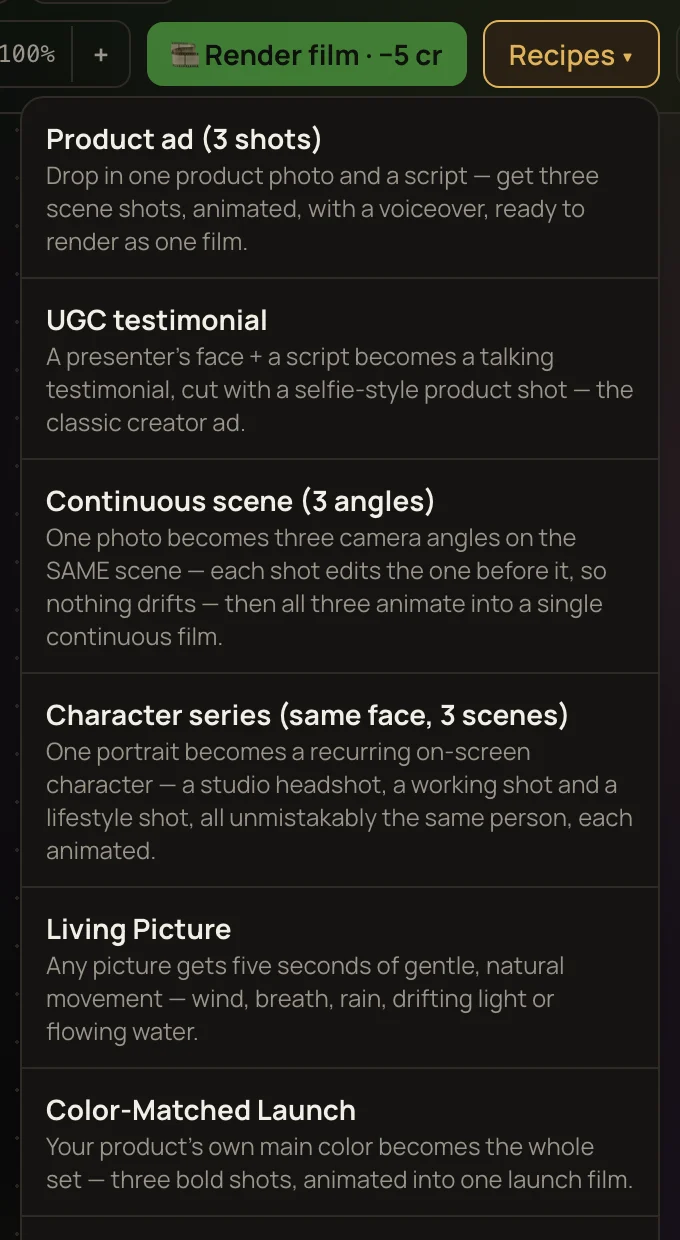
Fill in the blanks
Some recipes ask the Recipes page for a few words — a product name, a city, the line to read. Flow doesn’t ask. Instead, the prompts and voice lines show a blank in curly brackets, like {productName}. Type your own words over each blank before you run. A blank left in is sent to the model as it is.
Looks work the same way. On the Recipes page you pick a look from a menu; in Flow the recipe arrives with its first look already written into the prompts. Edit those words to change it.
Recipes keep their picture shape in Flow — square, upright or wide, the same as on the Recipes page. A recipe you loaded into Flow before 12 October 2026 still makes widescreen pictures; load it again to pick up its shape.
Run it and make the film
Boxes that don’t depend on each other run at the same time; each box waits for the boxes wired into it. When the clips are done, press 🎞 Render film to join them left to right, with the narration in place — see Rendering a film from your flow. Picture packs, and recipes that give you separate clips to pick from, don’t need a film: each result lands in your Library as it finishes.