🏷 Crisp Upscale is 20% off — 2 credits instead of 2.5Try it•🏷 Creative Upscale is 20% off — 50 credits instead of 62.5Try it•🏷 Clarity Upscaler is 20% off — 6 credits a megapixel instead of 7.5Try it•🏷 Qwen Edit 2511 is 20% off — 6 credits instead of 7.5Try it•🏷 FLUX Erase is 20% off — 10 credits instead of 12.5Try it•🏷 Seedream 4.5 Edit is 20% off — 8 credits instead of 10Try it•🏷 Seedream 5 Flash Edit is 20% off — 6 credits instead of 7.5Try it•🏷 Nano Banana 2 Edit is 20% off — 16 credits instead of 20Try it•🏷 Nano Banana 2.1 Edit is 20% off — 10 credits instead of 12.5Try it•🏷 FLUX.2 Klein 9B Edit is 21% off — 5 credits instead of 6.3Try it•🏷 Ideogram Character is 20% off — 30 credits instead of 37.5Try it•🏷 GPT Image 2 Edit is 20% off — 43 credits instead of 53.8Try it•🏷 GPT Image 2.5 Flare Edit is 20% off — 11 credits instead of 13.8Try it•🏷 GPT Image 2.5 Sunburst Edit is 20% off — 11 credits instead of 13.8Try it•🏷 Meta Muse Edit is 20% off — 2 credits instead of 2.5Try it•🏷 Grok Imagine Edit is 21% off — 5 credits instead of 6.3Try it•🏷 Bria Expand is 20% off — 8 credits instead of 10Try it•🏷 Ideogram Reframe is 20% off — 12 credits instead of 15Try it•🏷 Topaz Video Upscale is 20% off — 4 credits a second instead of 5Try it•🏷 FLUX Video Upscale is 20% off — 28 credits a second instead of 35Try it•🏷 Grok Imagine Extend is 20% off — 20 credits a second instead of 25Try it•🏷 Lucy Edit Pro is 20% off — 30 credits a second instead of 37.5Try it•🏷 Kling O3 4K Edit is 20% off — 84 credits a second instead of 105Try it•🏷 Luma Modify is 20% off — 70 credits a second instead of 87.5Try it•✨ New: Nano Banana 2.1Try it•✨ New: Grok Video 1.5 LiteTry it•Credits never expire — whatever you buy rolls over foreverSee pricing•
🏷 Crisp Upscale is 20% off — 2 credits instead of 2.5Try it•🏷 Creative Upscale is 20% off — 50 credits instead of 62.5Try it•🏷 Clarity Upscaler is 20% off — 6 credits a megapixel instead of 7.5Try it•🏷 Qwen Edit 2511 is 20% off — 6 credits instead of 7.5Try it•🏷 FLUX Erase is 20% off — 10 credits instead of 12.5Try it•🏷 Seedream 4.5 Edit is 20% off — 8 credits instead of 10Try it•🏷 Seedream 5 Flash Edit is 20% off — 6 credits instead of 7.5Try it•🏷 Nano Banana 2 Edit is 20% off — 16 credits instead of 20Try it•🏷 Nano Banana 2.1 Edit is 20% off — 10 credits instead of 12.5Try it•🏷 FLUX.2 Klein 9B Edit is 21% off — 5 credits instead of 6.3Try it•🏷 Ideogram Character is 20% off — 30 credits instead of 37.5Try it•🏷 GPT Image 2 Edit is 20% off — 43 credits instead of 53.8Try it•🏷 GPT Image 2.5 Flare Edit is 20% off — 11 credits instead of 13.8Try it•🏷 GPT Image 2.5 Sunburst Edit is 20% off — 11 credits instead of 13.8Try it•🏷 Meta Muse Edit is 20% off — 2 credits instead of 2.5Try it•🏷 Grok Imagine Edit is 21% off — 5 credits instead of 6.3Try it•🏷 Bria Expand is 20% off — 8 credits instead of 10Try it•🏷 Ideogram Reframe is 20% off — 12 credits instead of 15Try it•🏷 Topaz Video Upscale is 20% off — 4 credits a second instead of 5Try it•🏷 FLUX Video Upscale is 20% off — 28 credits a second instead of 35Try it•🏷 Grok Imagine Extend is 20% off — 20 credits a second instead of 25Try it•🏷 Lucy Edit Pro is 20% off — 30 credits a second instead of 37.5Try it•🏷 Kling O3 4K Edit is 20% off — 84 credits a second instead of 105Try it•🏷 Luma Modify is 20% off — 70 credits a second instead of 87.5Try it•✨ New: Nano Banana 2.1Try it•✨ New: Grok Video 1.5 LiteTry it•Credits never expire — whatever you buy rolls over foreverSee pricing•
How to read the model list, and when to let Auto choose.
Each lane in the Studio has its own list of models. The Model picker sits right under the lane tabs, and it shows only the models for the lane you’re in.
Pick a model
1
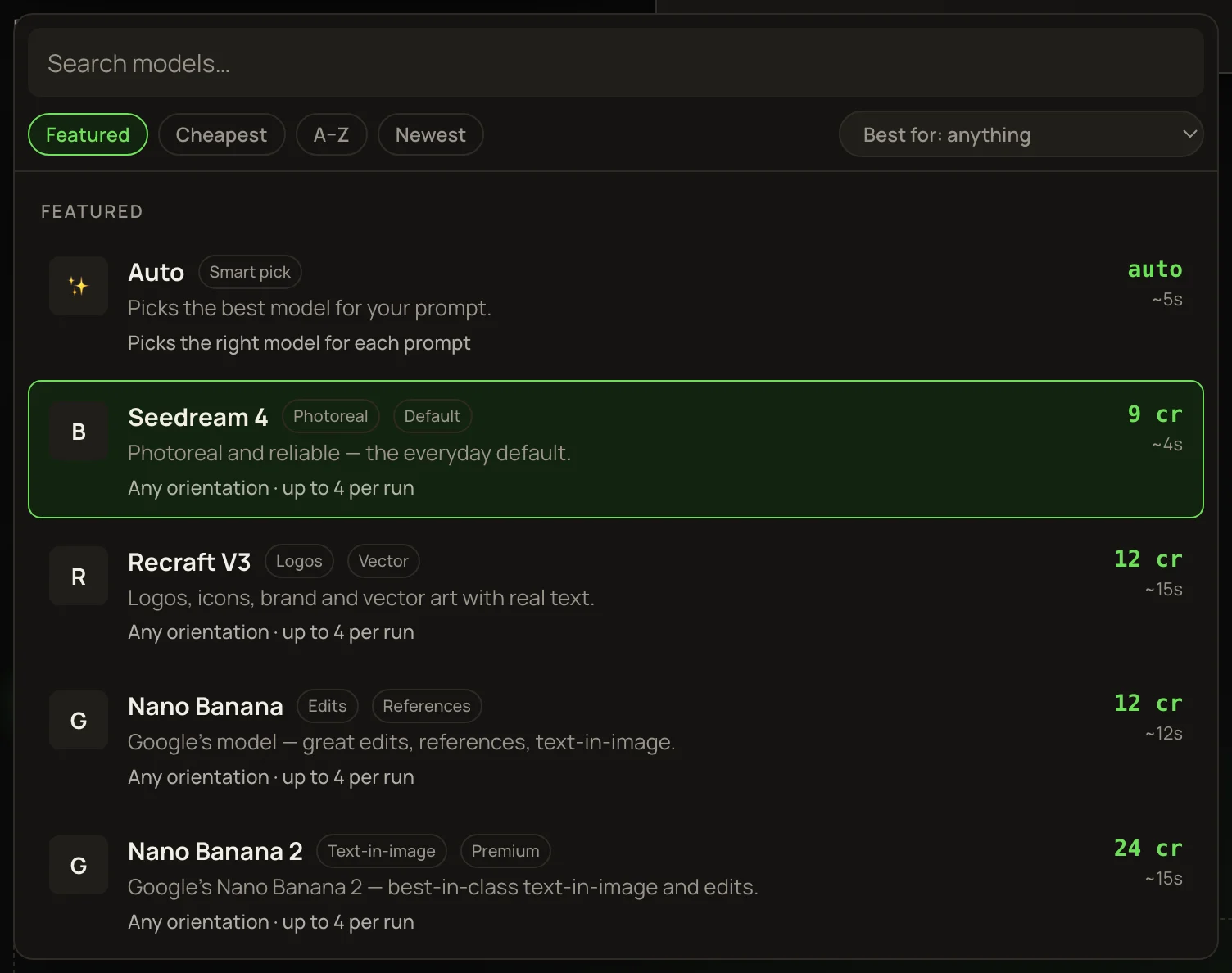
Click the Model box under What are you making? The list opens.
2
Narrow it down. Type in Search models… to match a name, a maker or a tag. Or choose a use from the Best for dropdown, like Photoreal or Typography & text.
3
Change the order with Featured, Cheapest, A–Z or Newest.
4
Click a row. The main button now shows what one run costs.
Featured lists our picks first, then every other model grouped by maker. Newest sorts by release date. Auto always stays at the top. Best for only offers uses this lane has a model for.
What a row tells you
Name and tags
The model’s name, then its first two tags — the quickest hint at what it’s for.
Two lines of detail
What it’s best at, then what it takes or makes: clip lengths, resolutions, or how many pictures per run.
Price
Credits for one picture or one run. Video is priced per base clip, like cr / 5s. Talk, lip sync and Clip tools are cr / sec. The Clarity Upscaler is cr / MP of result. Auto shows auto.
Time
A typical wait, like ~5s for a picture or ~3 min for a video.
% off
You pay less than the usual price, which is struck through beside was. Every Edit and Clip tools model has a standing discount. Other models show it while they’re on sale.
Paused
Greyed out and can’t be picked for now. Choose another model.
What the tags mean
Typography · Posters · Text
Good at words inside the picture: posters, signs, titles.
Photoreal · Aesthetic
Realistic photos, or a natural, less “AI” look.
Logos · Vector · Design
Brand marks, icons and flat graphics.
Budget · Fast
Cheap and quick. Good for drafts and trying ideas.
Flagship · Premium · Pro
The best quality, at the top price.
Text→video
Makes a clip from words alone. No picture needed.
Entities
Builds the clip from your saved characters, props and places. See Entities.
Latest
One of the newer releases. Sort by Newest for exact release order.
Auto, the smart default
Auto is the default in the Image and Video lanes. It picks a real model when you press the button, and you pay that model’s price. The result names the model that ran.
Auto in Image
Prompts about words — a logo, poster, sign, title, font, brand or headline — go to Recraft V3. Everything else goes to Seedream 4, the everyday photoreal pick.
Auto in Video
Always runs Kling 2.5 Turbo Pro, for 5 or 10 seconds. It needs a picture to animate. For ✨ Direct · free or an end frame, pick Kling 2.5 Turbo Pro yourself — Auto doesn’t offer them.
NoteOn Auto the button says cost varies instead of a number. To see the exact price before you run, pick the model yourself.
Spend smart
Try ideas on cheap models first: pictures start at 1 credits, and Cheapest puts them at the top. Once a prompt works, run it again on a flagship model. Video starts at 38 credits a clip, so get the picture right before you animate it.
Model guides
The models people use most have longer guides at solorender.com/learn: what each one is best at, where it falls down, and prompts that are known to work. In the Studio, those prompts sit under the prompt box — press Show starter prompts.