Making voiceovers and music
Type a script for a voiceover, or describe a track and get music.
The Audio lane makes two kinds of sound: a voiceover read from your script, and music from a description. The price is on the button before you run, and a failed run is refunded.
Make a voiceover
- 1Click Audio in the sidebar. It opens on ElevenLabs Voice.
- 2To use another voice model, pick it in Model.
- 3Choose a voice in Voice.
- 4Type the words in Script — up to 1,000 characters. The counter under the box keeps count.
- 5Click Generate voiceover.
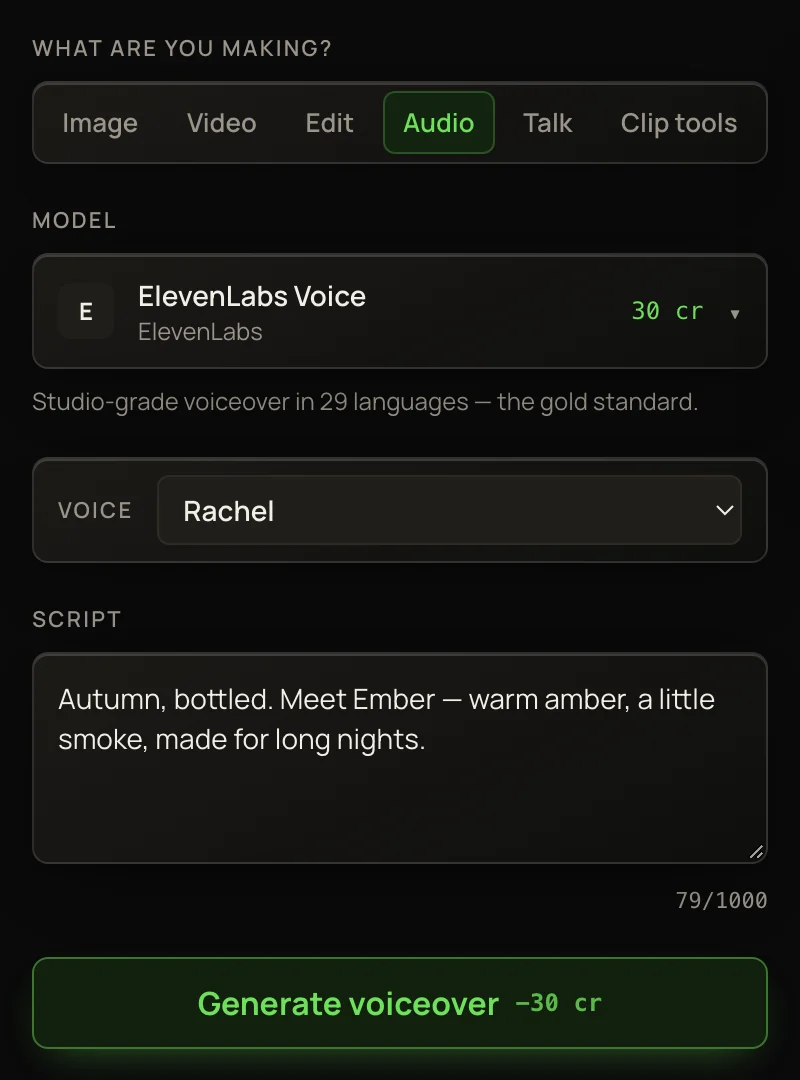
Each voice model charges one flat price per voiceover, however long the script is, up to the cap.
ElevenLabs Voice
Studio-grade narration in 29 languages — the quality pick. 25 credits.
MiniMax Speech 2.8
MiniMax’s newer model: the same voices as 2.6, back in seconds. 25 credits.
MiniMax Speech 2.6
Expressive, natural narration. 25 credits.
Gemini 3.8 Voice
Google’s voices. Each one shows its style in the list, like “Kore · firm”. 12 credits.
Kokoro
Clean American-English narration at the lowest price. Takes about a minute. 5 credits.
Make music
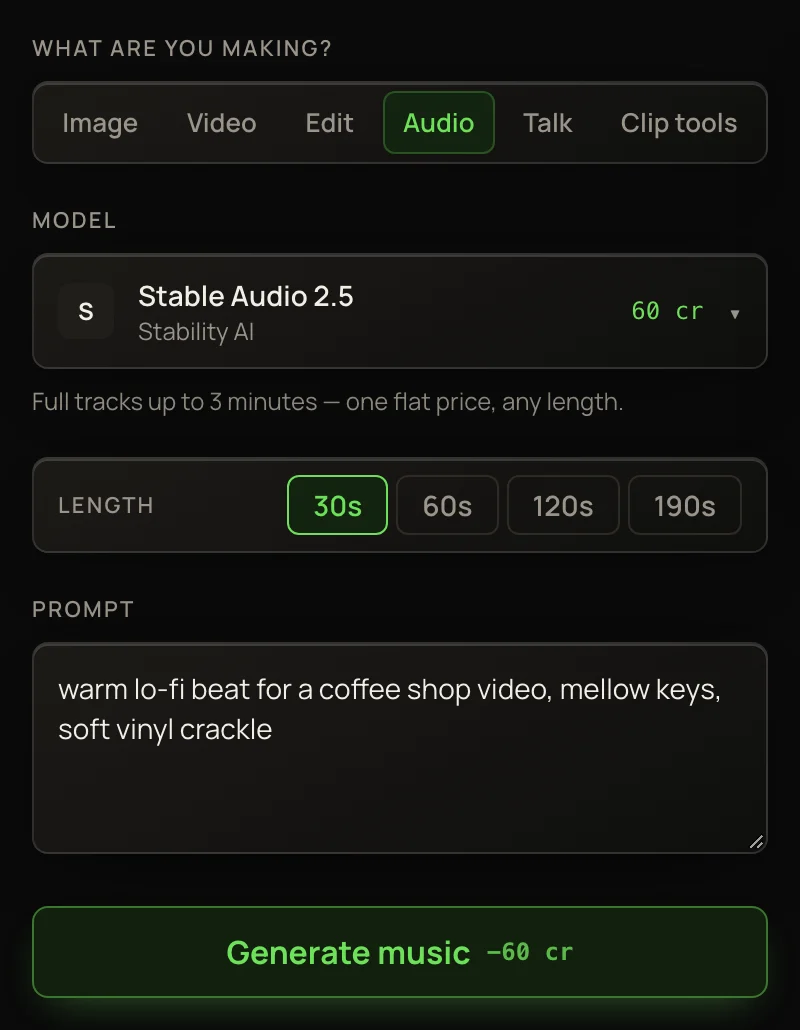
- 1In Model, pick a music model. They’re tagged Music.
- 2If the model offers a Length, pick one.
- 3In Prompt, describe the track: genre, mood, tempo, instruments.
- 4Click Generate music.
TipOn Lyria 2 and Lyria 3.5, the Avoid (negative prompt, optional) box leaves things out: “vocals, drums, distortion”.
Lyria 2
Rich instrumental tracks, about 30 seconds long. 25 credits a track.
Lyria 3.5
A full song, with vocals and lyrics, from one description. 25 credits a song.
Stable Audio 2.5
Tracks from 30 seconds to just over 3 minutes. One flat price for any length: 50 credits.
ElevenLabs Music
30 seconds to 3 minutes, billed by the second: 3 credits a second.
CassetteAI Music
Quick background music, 30 seconds to 3 minutes — the budget pick. 5 credits per started minute.
NoteKokoro, Lyria 3.5 and Stable Audio 2.5 take longer, so they wait in line the way video does: a card shows the progress, you’re charged once, and if you close the page the track still finishes and lands in your Library.
Play, download and reuse
A finished track plays in the result panel. Open / download the audio file ↗ opens the file so you can save it. The track also lands in Recent work and your Library as a tile you can play.
A voiceover you make here can give a photo its voice, or a clip a new one, in the Talk lane.
More in Creating Images, Video & Audio
Generating images
Make one to four pictures from a prompt, in the shape you need.
Editing photos with instructions
Change any picture by describing the change in plain words.
Upscaling images
Make a picture bigger and sharper, from a quick cheap sharpen to brand-new fine detail.
Removing objects with the erase brush
Paint over anything and it disappears, with the background filled in.