Clip tools: upscale, extend or edit a clip
Make a finished clip sharper, add seconds to it, or change it by describing the change.
The Clip tools lane works on finished videos — ones you made here, or your own. Pick a tool and a new clip comes back. Your original stays as it is.
Bring in a clip
- 1Click Clip tools in the sidebar. It opens on Topaz Video Upscale.
- 2Under Clip, click Upload a clip — MP4 or MOV, up to 60 seconds and 90 MB — or Library to pick one you made here.
- 3Pick a tool in Model. The Clip box shows your clip’s length and height, like “A 5s clip at 720p”.
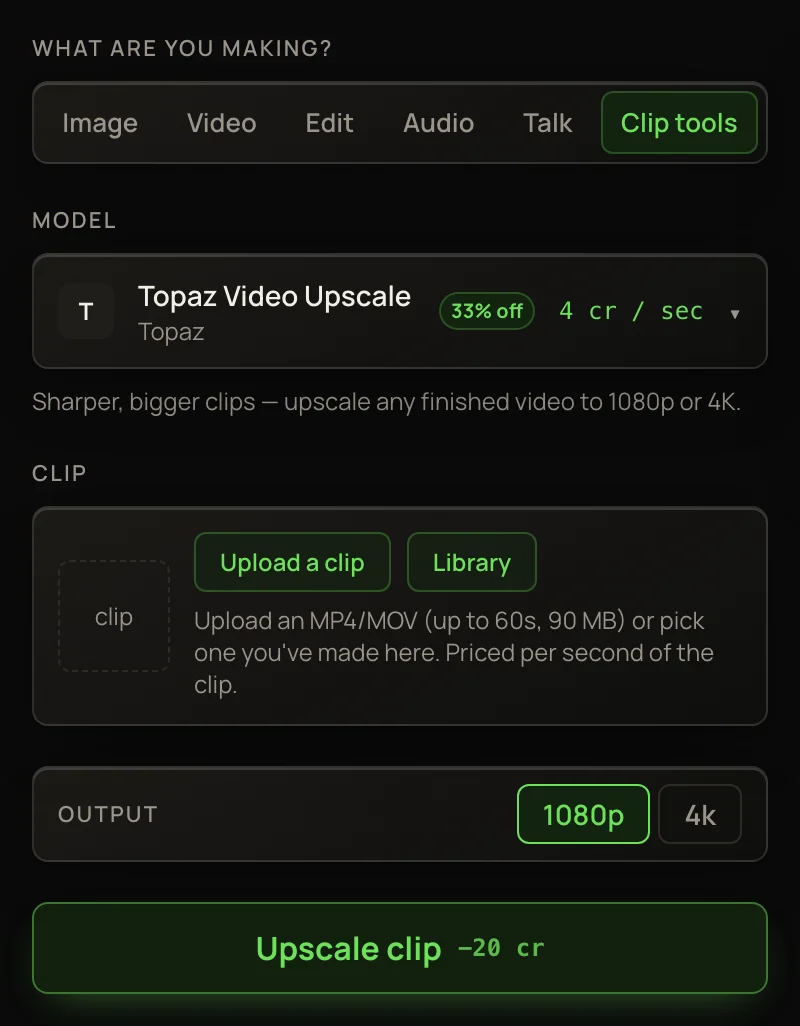
Upscale
Upscalers need no prompt. Pick a size under Output and click Upscale clip.
- Takes
- clips up to 60 seconds
- Gives
- 1080p or 4k
- Takes
- clips up to 20 seconds
- Gives
- 1080p, 2k or 4k
Because of that 1.5× step, FLUX’s output must be at least 1.5 times your clip’s height. A clip up to 720p can go to any size. A 1080p clip can only go to 4k. A clip taller than 1440p can’t use FLUX. Pick a size that’s too small and you’ll see “the smallest upscale is 1.5×, so choose a higher output tier” — nothing is charged.
Extend
- 1Pick Grok Imagine Extend in Model.
- 2Under Add, pick how many seconds to add: 4s, 6s, 8s or 10s.
- 3In Prompt, describe what happens next: “she turns and walks out, the camera follows”.
- 4Click Extend clip.
You pay for the seconds added, not the whole clip: 20 credits a second. The source clip must be 2 to 15 seconds long, so an extended clip can be extended again only while it’s still 15 seconds or shorter.
Edit with words
Type what should change, and the whole clip is made again with its motion kept: “make it snow”, “swap the jacket for a red one”, “turn it into a watercolor animation”. Then click Edit clip.
- Gives
- 720p
- Takes
- clips of 3–15 seconds
- Gives
- 4K, with the clip’s own sound
Restyle a clip with a style
Pick Kling O3 4K Edit, add your clip, then press 🎨 Style and pick a look. If the prompt box is empty it fills in for you: redraw the whole clip, keep the same people, movement, camera and timing, change only the look. Kling is shown the style’s example pictures. The other clip models get the style’s written description only.
Price, versions and limits
Clip tools charge per second of your clip, measured from the file. Extend is the exception: it charges for the seconds added. The total is on the button before you run.
Clip tools carry a standing discount, so the picker shows 20% off and the regular price struck through.
Extend and the edit tools can start 1 to 4 Versions at once — each is its own run and charge. Upscalers make one clip.
Each tool takes clips of a certain length. A clip outside that range is turned away before you’re charged, for example: “Kling O3 4K Edit takes clips of 3–15 seconds — this one is 20s. Nothing was charged.”