How to prompt
Eight short lessons on writing prompts that get the picture or clip you meant, each with a real before and after.
A prompt is a brief for a very fast artist who never asks questions. Whatever you leave out, it fills with the most ordinary choice it knows. These lessons show how to leave less out. Every picture and clip below was made in solorender with the prompt shown next to it.
1. Write a scene, not a pile of tags
Older picture tools wanted lists of keywords. Today's models read a sentence the way a person does, so describe one moment. Answer six questions, in any order:
Skip the “8k, masterpiece, ultra detailed” tags. They don't add quality. They just pull the picture toward the stock look in lesson 3.
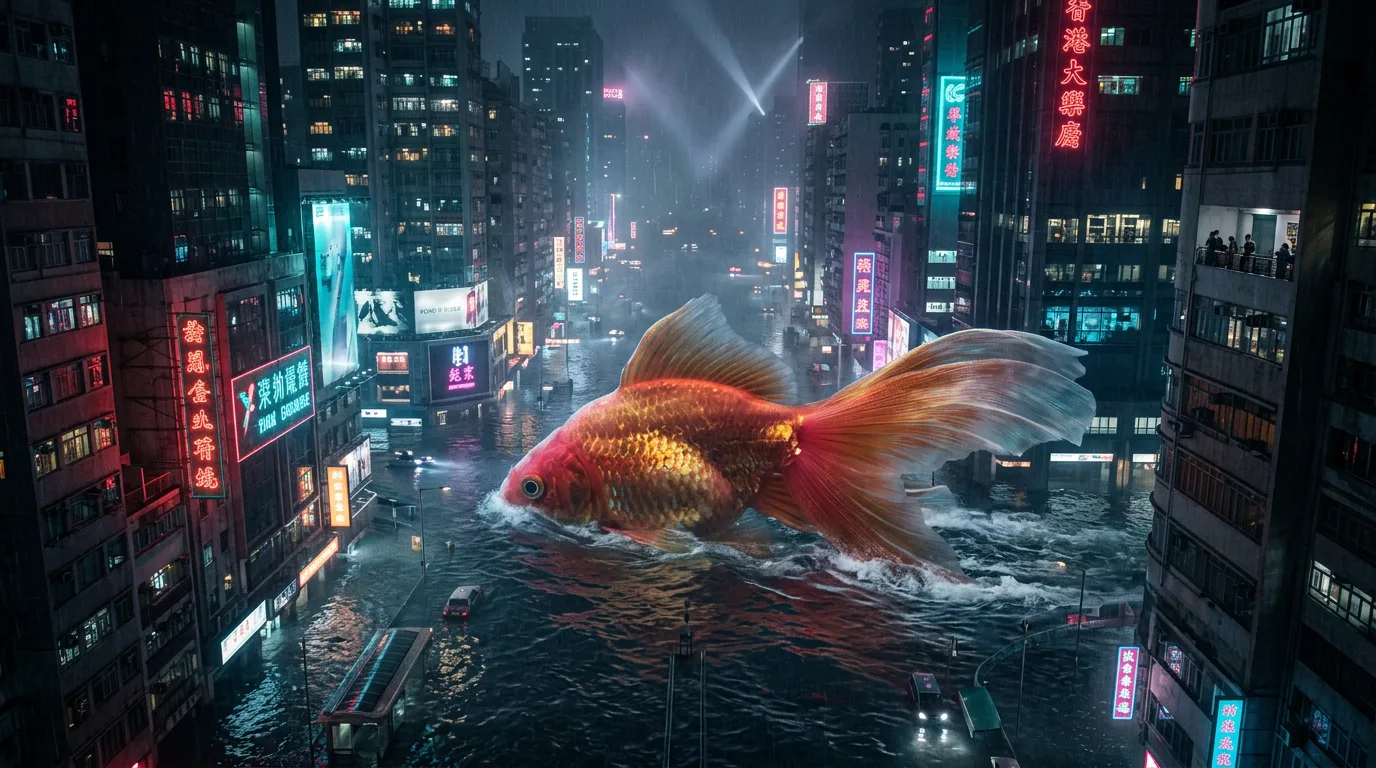
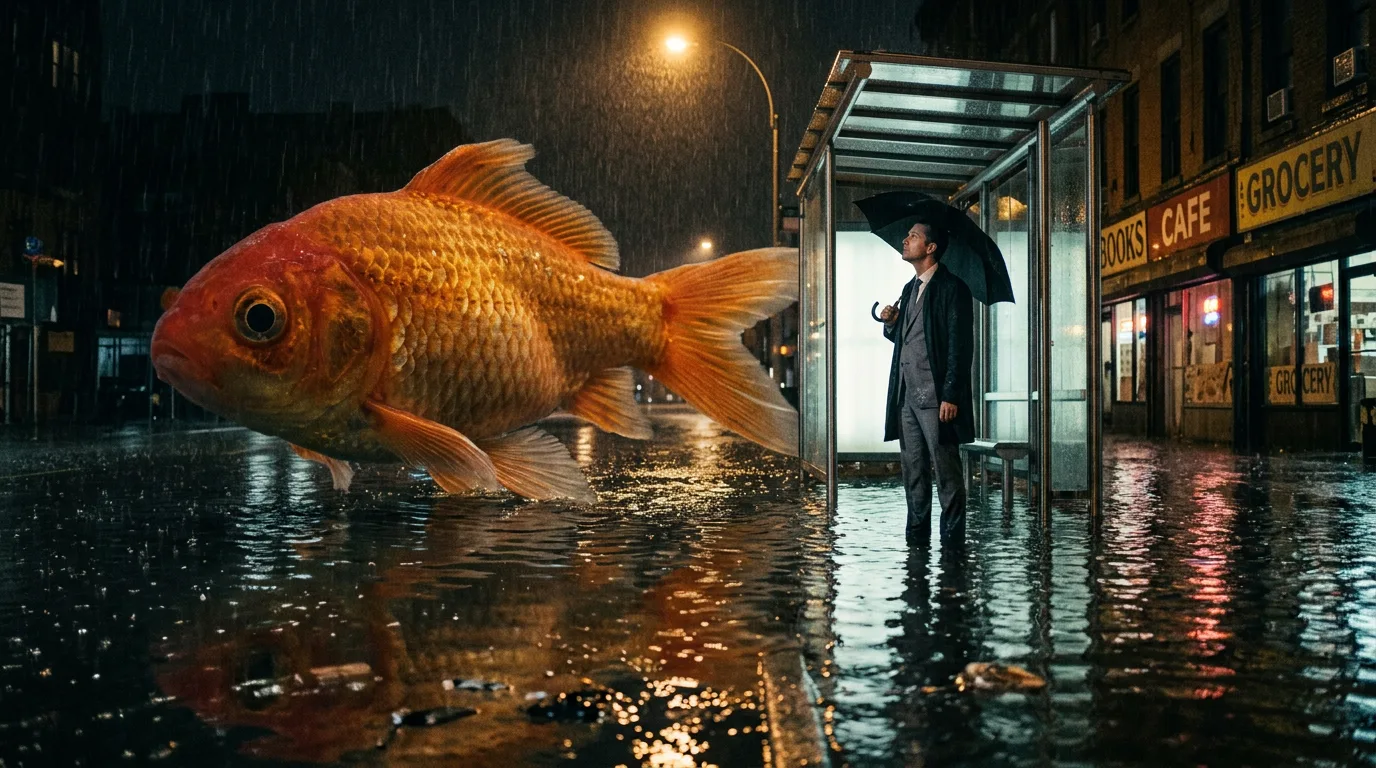
Both made with Nano Banana 2.1, from the same idea. The tag pile came back as a pretty postcard: a big fish over a neon city, with nobody in it and nothing happening. The scene got the joke, because it said who is there and what they do: the man at the bus stop, staring up with a straight face, his umbrella still up under the shelter.
giant goldfish, flooded city, night, neon, cinematic, 8k, ultra detailed, masterpiece
At night on a flooded city street, a goldfish the size of a bus glides slowly past a bus stop, its orange scales catching the light of a flickering streetlamp. A man in a grey suit stands under the bus-stop roof holding a black umbrella, staring up at it with a completely straight face, the water up to his ankles. The fish's reflection ripples across the dark water. We see it from across the street at knee height, rain falling, small local shops with hand-painted signs glowing softly in the distance.
One line in there is a fix. Our first try drew a real chain store's sign across the street. Asking for “small local shops with hand-painted signs” kept real brands out of the picture. If a detail matters, give it its own sentence.
2. Words in the picture: quote them, and say where they go
If you only describe what a sign is about, the model writes its own words. Put the exact words in quotation marks and say where each one goes. Keep it to a few pieces of text in one or two sizes. Long paragraphs and tiny labels still come out as squiggles.
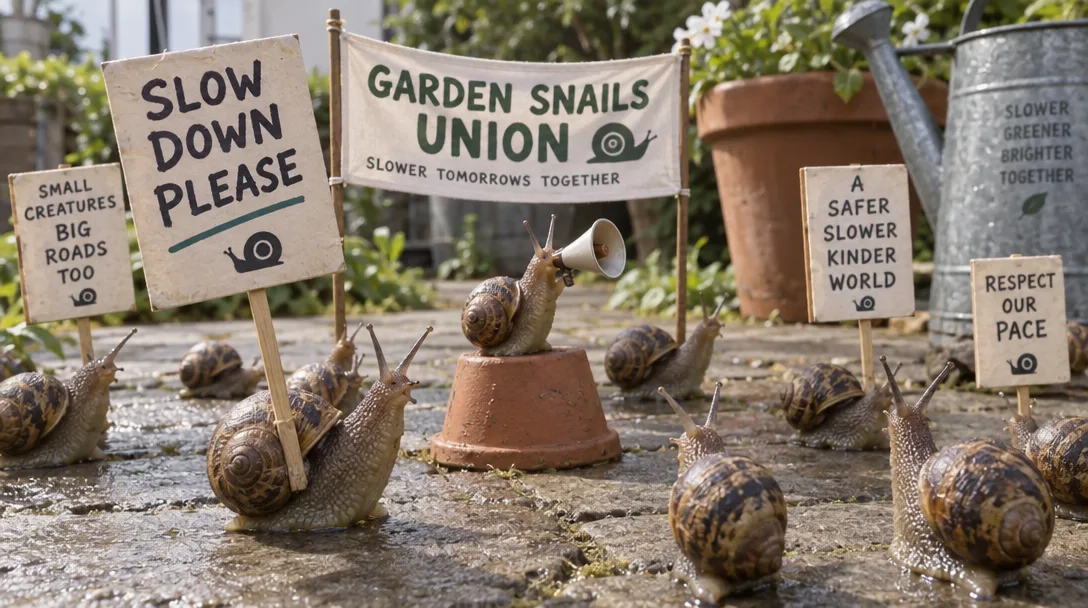
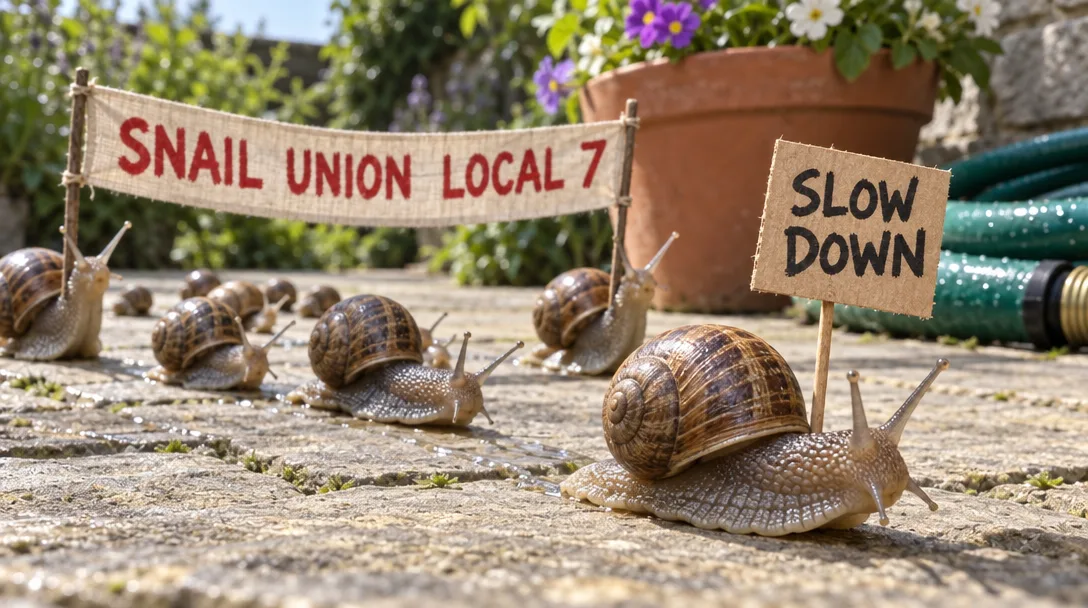
Both made with GPT Image 2.5 Sunburst. Left: the model wrote its own slogans, seven signs and a banner, and none of them are ours. Right: exactly “SLOW DOWN” and “SNAIL UNION LOCAL 7”, spelled right, where we asked for them.
garden snails holding a protest on a patio with a sign asking people to slow down and a banner for their union
A protest march of garden snails crossing a sunny stone patio, seen from snail height. The snail at the front carries a tiny cardboard sign on a toothpick that reads "SLOW DOWN" in thick black marker. Behind the marchers, two snails hold up a long strip of fabric between them with the words "SNAIL UNION LOCAL 7" painted in red capitals. A garden hose and a flowerpot loom in the background.
When one word comes out wrong, don't start over. Open the picture in an edit model and name just that fix, for example: Change “LOCAL 1” to “LOCAL 7”. Keep everything else the same. Spelling a stubborn word out letter by letter helps it land.
3. Lose the “AI look”
Left to itself, a model gives you the same picture everyone else gets: the most obvious version of the idea, the subject dead centre, lit evenly, with everything sharp and skin like plastic. People spot it in half a second. Two habits fix it.
- 1Direct the shot. Put the subject off centre. Catch them in the middle of doing something. Put something between the lens and the subject. Give them one detail that surprises.
- 2Finish it. Ask for gentle contrast, a background that falls into soft blur and a little film grain. When skin shows, ask for real skin: pores, lines, age spots, not retouched.
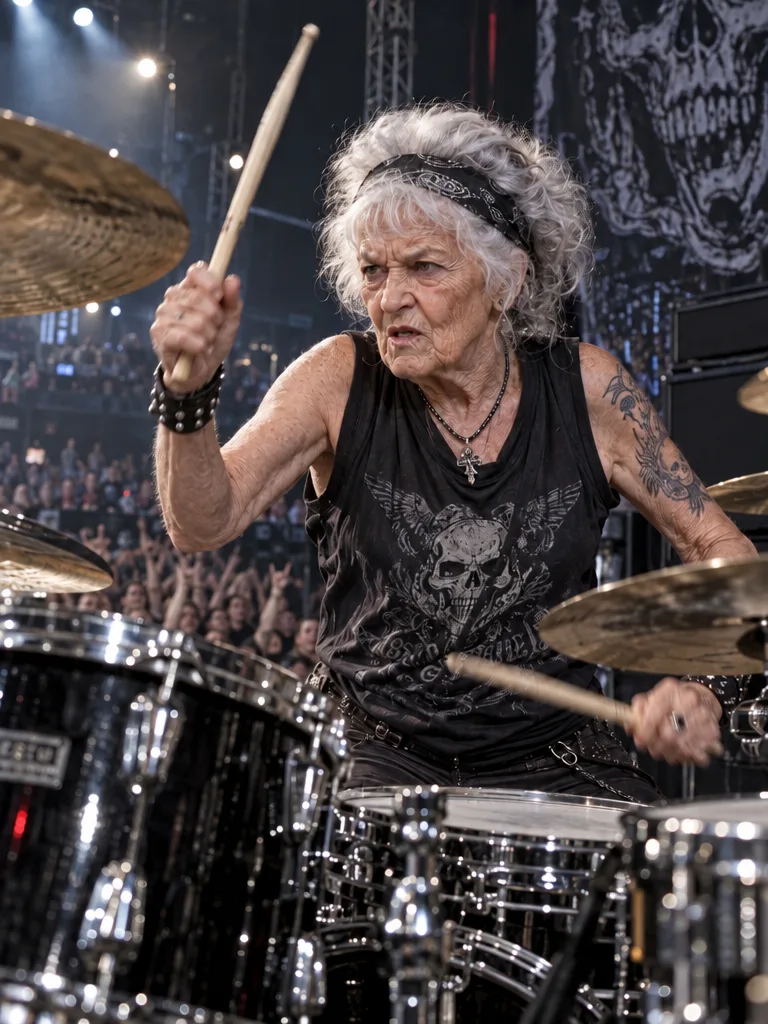
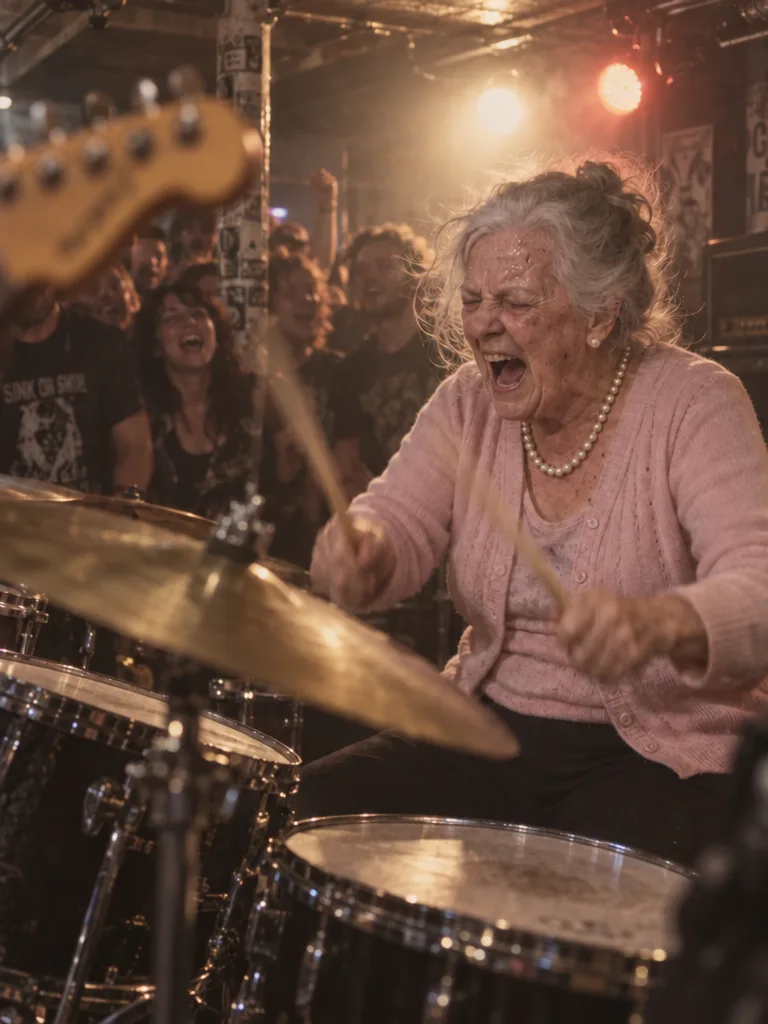
Both made with GPT Image 2.5 Sunburst. Left: the obvious version, a “rocker granny” in a skull vest on a glossy arena stage. Right: a grandmother in a cardigan and pearls, caught mid-yell in a sweaty basement, a guitar neck in front of the lens and the crowd laughing behind her. The surprise is the joke. (We blanked a guitar-amp brand name off both pictures with one edit each, the trick from lesson 5.)
portrait of an old woman playing drums at a rock concert, hyper realistic, ultra detailed, 8k, sharp
A grandmother in her seventies, in a pale pink cardigan and a string of pearls, plays the drums at a packed basement rock show. She is caught mid-yell, bringing both sticks down on the crash cymbal, the sticks a blur, a strand of grey hair flying loose, sweat on her forehead. She sits on the right of the frame; the blurred edge of a guitar's headstock cuts across the left foreground. Hot stage lights from behind her, haze in the air. Natural skin with deep laugh lines and age spots, not retouched. Gentle contrast, warm muted colours, fine film grain.
Words that help, and words that hurt
Use two or three of these at a time. Piling on more makes them cancel each other out.
Leave these out: 8k, ultra detailed, hyper realistic, razor sharp, crisp, HDR. They push the picture back toward the plastic look. Lens numbers like “85mm f/1.4” barely change anything either. Describe what you want to see instead, such as “the background melts into blur”.
4. Make a character sheet before you reuse a character
Every new picture redraws a character from scratch, so faces drift from one picture to the next. Fix that once: make a single picture with three views of the character on a plain background, then save it as an entity. After that, type its @name in any prompt and the model gets the sheet as its reference.
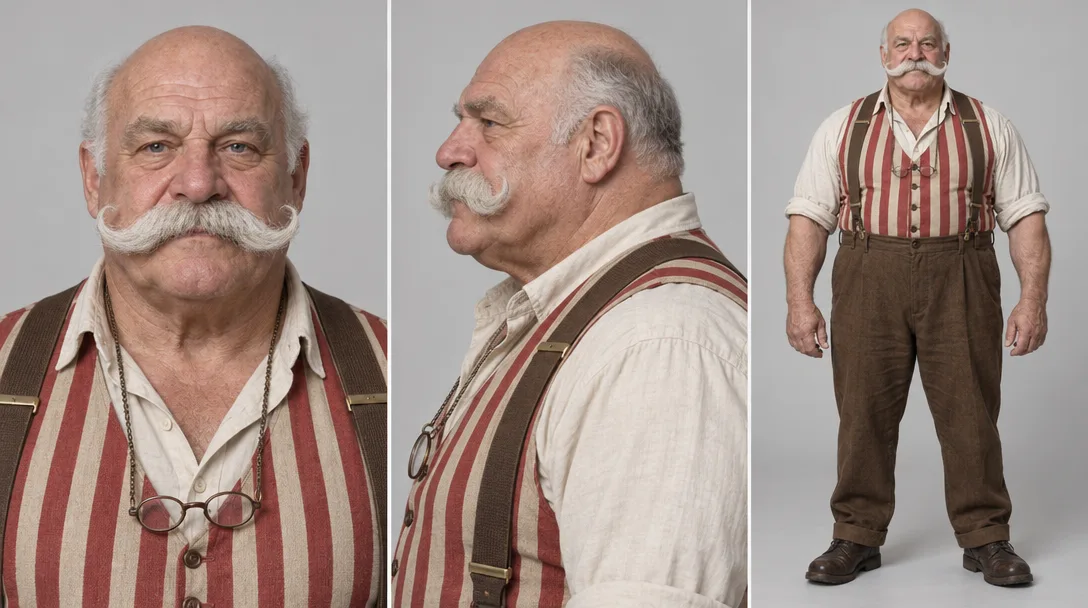
GPT Image 2.5 Sunburst. Close-up of the face, side profile, full body: the same moustache, striped vest and glasses chain in all three.
Character sheet of one man on a plain light grey background, three panels side by side. Left: a head-and-shoulders close-up looking straight at the camera. Middle: his head and shoulders in side profile, facing left. Right: his full body, standing, facing the camera. He is Brix, a retired circus strongman in his seventies: broad and barrel-chested, bald on top, with a huge curled white handlebar moustache, a red-and-cream striped vest under brown braces, rolled-up shirtsleeves showing big forearms, high-waisted brown trousers, and reading glasses hanging on a chain around his neck. Same face, clothes and colours in all three panels. Even, soft studio light.
Say which panel shows what. Write just “three views” and you can get three full-body poses with no close-up of the face, and the face is the part a likeness depends on. Then save the sheet as a character called brix and use him by name:
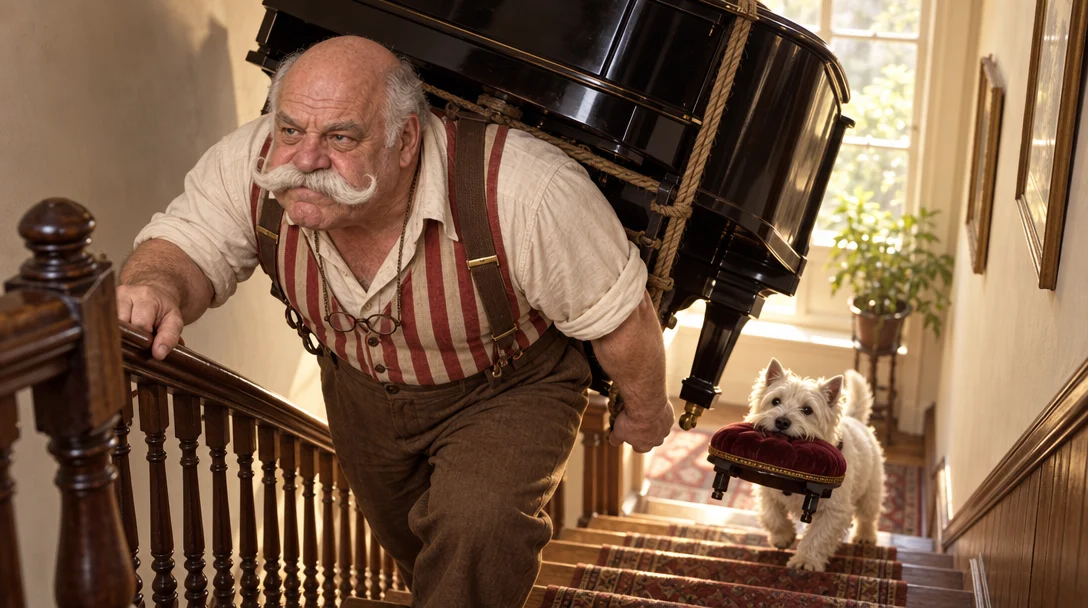
GPT Image 2.5 Sunburst Edit, prompt: @brix carries a black grand piano up a narrow wooden staircase on his back… A tiny white terrier trots up the stairs behind him, carrying the piano stool's cushion in its mouth. Same moustache, vest and glasses chain, in a scene the sheet never showed.
When the character changes, change the sheet first. New clothes or a new haircut means a new sheet, and every picture after that comes from the new one. Keep exactly one current sheet per character.
5. Editing: name the one change, then pin everything else
When a picture is nearly right, stop making new ones and edit it. An edit prompt is an instruction, not a description. Say the one thing to change, then list what has to stay exactly as it is. If you don't say what stays, the model feels free to “improve” it.
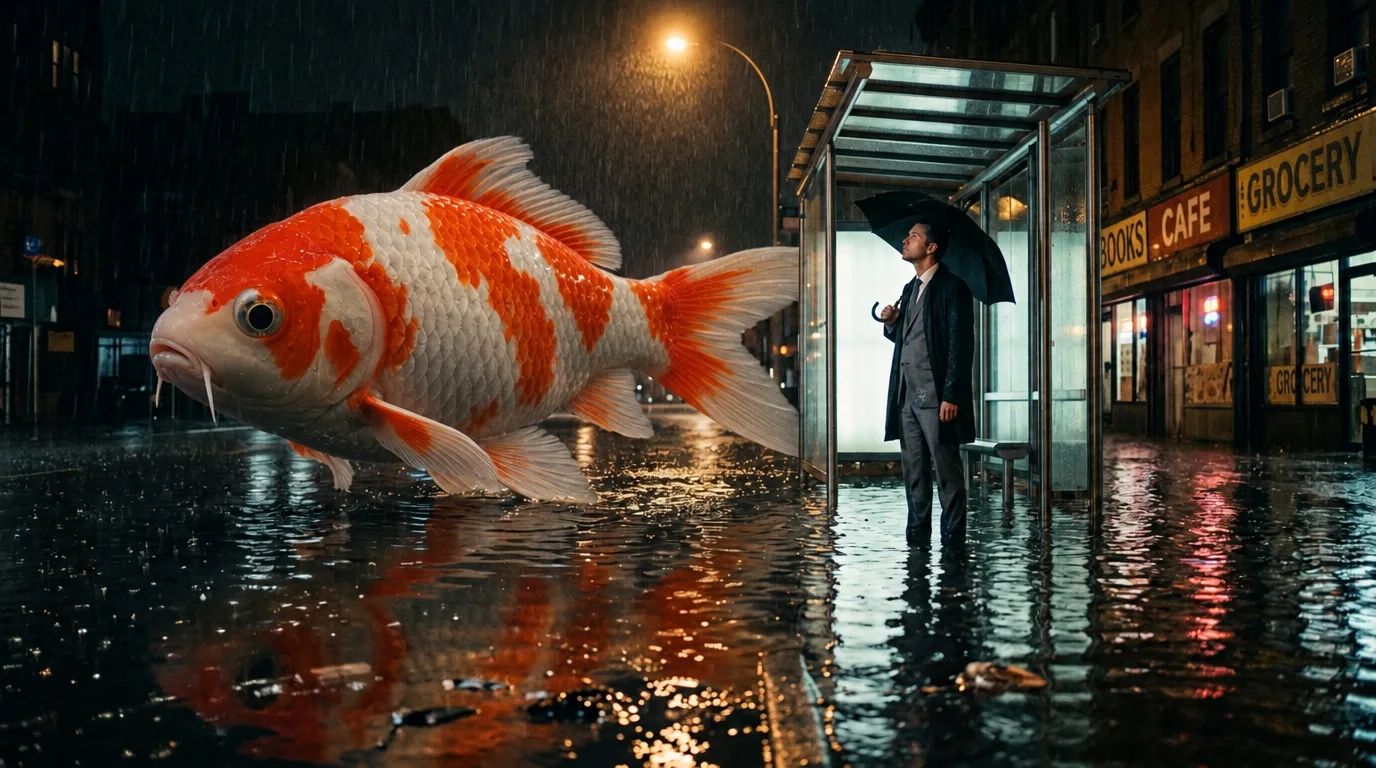
GPT Image 2.5 Sunburst Edit. The goldfish became a koi. The man, his umbrella, the shop signs and the reflections didn't move.
Change the goldfish into a koi with white skin and bright orange patches. Keep the man, his umbrella, the bus stop, the flooded street, the shop signs, the rain, the light and the camera angle exactly the same.
6. Start and end frames, or reference pictures?
Both put your own pictures into a video, but they do different jobs, and you can use both in the same clip.
Here is the same moment done both ways: Brix helps with a flat tyre. First, the two frames:
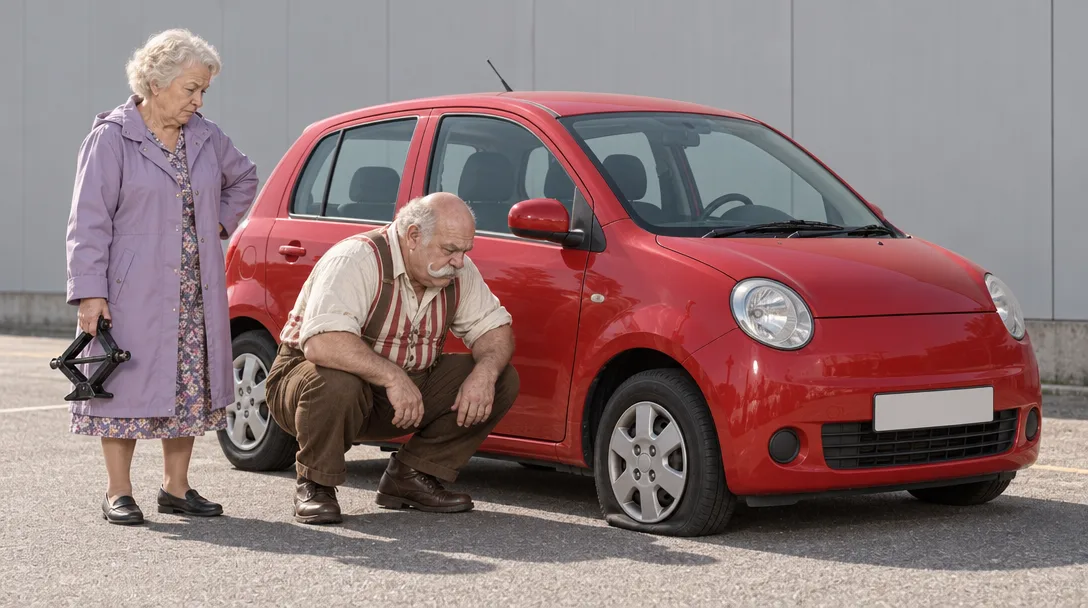
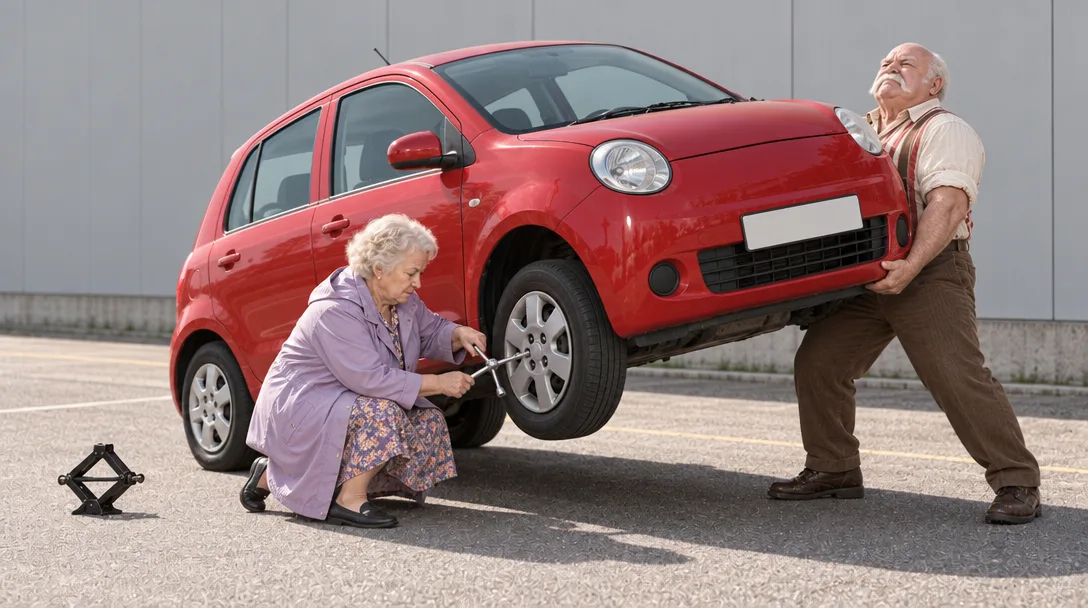
The end frame was made from the start frame with one edit: The strongman now stands at the front of the car and holds the whole front end of the car up at chest height with his bare hands… Keep both people's faces and clothes, the red car, the grey wall, the light and the camera angle exactly the same.
Left: Kling 2.5 Turbo Pro. It opens on our first picture and lands on our last, so the lift happens. Right: Kling O3 · Entities with @brix, same idea in words. It chose its own car, car park and angle, and Brix is clearly Brix, but he never lifts the car. A reference decides who is in the shot, not how it ends. When the ending is the joke, pin it with an end frame.
7. One action, one camera move, and say “slow”
Ask for several moves at once and the model fakes them with cuts and warping. Give each clip one thing that happens and one way the camera moves, and slow both down. Slow movement hides what a model draws badly. Fast movement shows every flaw.
Kling 2.5 Turbo Pro, both from the lesson 1 picture. Left: camera orbits around the man then zooms in fast then pans up to the sky while the fish turns around and the man runs away. It jumps between angles, the man vanishes, and it ends on a fish in an empty sky. Right: Slow push-in toward the man at the bus stop as the giant goldfish glides slowly past him… The camera only moves forward. The man and the bus shelter both grow in the frame, which is how you know the camera really moved in, and the fish keeps the joke going.
Camera moves in plain words
Shot sizes and angles
Two more rules keep clips clean. If someone walks out of frame, they stay gone, so don't ask them to come back in the same clip. Ask only for what can be seen or heard: smells, thoughts and backstory come out as nothing.
8. Dialogue: quote the line, keep it short, and check the timing
Video models with sound will speak the words you write. Put the exact line in quotation marks, say who says it and how, and keep it short enough to fit. Then list what happens in order, one beat per sentence, and end with “no background music, no on-screen captions”: music the model adds can't be taken out later, and neither can burned-in words.
Veo 3.1 Fast, from text only. Press play for the sound.
Close-up, camera still. A grumpy old stone garden gnome with a chipped red pointed hat and a long grey beard sits on a mossy rock in a sunny back garden. The clip opens in silence except for birdsong; the gnome does not move or speak at first.
First, a robin flutters down from above and lands on the tip of the gnome's hat.
Only after the robin has landed and settled, the gnome slowly rolls his stone eyes up toward it and mutters in a gravelly voice: "Not again."
Then the robin hops off the hat and flies away, and the gnome lets out a heavy sigh.
Sounds: birdsong, the flutter of wings. No background music, no on-screen captions.
The line came out word for word, in a gravelly voice, with no music and no captions. The timing did not. The gnome says “Not again” in the first second, as the robin arrives, not after it has settled. We tried twice, once with seconds written out (“0–3 s… 3–6 s…”) and once with the beats in order as above, and both times the line came early. Today's models are good at whatis said and loose about when. If a line has to land after an action, make two short clips, the action and then the line, and join them.
Quick checklist
- 1One moment: who, doing what, where, in what light, seen from where.
- 2Exact words in quotes, each with a place.
- 3Off centre, caught mid-action, real skin, soft background. No “8k”.
- 4A character sheet before a character appears twice.
- 5Edits name one change and pin the rest.
- 6Frames for an exact shot, @names for the same character everywhere.
- 7One action, one slow camera move per clip.
- 8Spoken lines in quotes. No music, no captions. Check when the line lands.
Try it on your own idea
Every model on this page is live in solorender, on one set of credits that never expire.
Open the Studio →